By Lon (Alonzo) Hosford
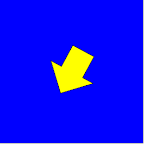 This my own version of of Keith Peter’s Foundation Actionscript 3.0 Animation: Making Things Move chapter 3 implementation of sprite rotation following a mouse.
Download files
[August 10 2010 – I updated this to an Actionscript project in Flex Builder 4. ]

You can build this with the free Flex SDK by using the code in the src folder. Same for Flash CS3 and later versions. You need to create a Flash Document in the src folder and set the document class to Chapter03_Rotation_AS3. For your convenience the Flash CS4 example download is included.
This article shows the code for the Flex project.
Application Class – Chapter03_Rotation_Flex
This Flex version is a spark implementation. The SpriteVisualElement component shown on line 51 is used to add the code to the application display on line 31.
<?xml version="1.0" encoding="utf-8"?>
<!--
	Application class for showing sprite rotation following mouse movement.
	<p>Author: Lon Hosford https://www.lonhosford.com 908 996 3773</p>
    <p>Reference: Keith Peter's Actionscript 3.0 Animation Chapter 3</p>

-->
<s:Application xmlns:fx="http://ns.adobe.com/mxml/2009"
			   xmlns:s="library://ns.adobe.com/flex/spark"
			   xmlns:mx="library://ns.adobe.com/flex/mx" width="400" height="400"
			   creationComplete="creationCompleteHandler(event)"
			   viewSourceURL="srcview/index.html">
	<fx:Script>
		<![CDATA[
			import mx.events.FlexEvent;

			// Properties for background
			private static const backgroundColor:Number = 0x0000ff;
			private static const backgroundBorderColor:Number = 0x666666;
			private static const backgroundBorderWeight:Number = 2;
			/**
			 * Handler for Application creationComplete event
			 * */
			protected function creationCompleteHandler(event:FlexEvent):void
			{
				// Create an Arrow object
				var arrow:Arrow = new Arrow();
				// Wrap arrow object into a RotateSpriteToMouse object
				var rotateToMouse:RotateSpriteToMouse = new RotateSpriteToMouse(arrow);
				// Add rotateToMouse Sprite to a SpriteVisualElement
				arrowVisualElement.addChild(rotateToMouse);
				// Center the SpriteVisualElement
				arrowVisualElement.x = background_bc.width / 2;
				arrowVisualElement.y = background_bc.height / 2;
			}

		]]>
	</fx:Script>
	<!---
	Background for app
	-->
	<s:BorderContainer id = "background_bc"
					   width="{width}" height = "{height}"
					   borderWeight="{backgroundBorderWeight}"
					   borderColor="{backgroundBorderColor}"
					   backgroundColor="{backgroundColor}">

		<!---
		Spark container for Sprite
		-->
		<s:SpriteVisualElement id="arrowVisualElement" />

	</s:BorderContainer>

</s:Application>
[ad name=”Google Adsense”]
RotateSpriteToMouse Class
This is the class that does the work. Listening to the Event.ENTER_FRAME event leads to the update_rotation() method that does the work of updating the rotation.
package
{
	import flash.display.Sprite;
	import flash.events.Event;
	/**
	 * Rotates sprite to mouse position
	 * */
	public class RotateSpriteToMouse extends Sprite
	{
		private var _sprite_to_rotate:Sprite;	// Sprite to rotate to mouse
		/**
		 * Constructor
		 * @param sprite_to_rotate The sprite to rotate
		 * */
		public function RotateSpriteToMouse(sprite_to_rotate:Sprite)
		{
			_sprite_to_rotate = sprite_to_rotate;
			addChild(_sprite_to_rotate);
			addEventListener(Event.ENTER_FRAME, enterFrameEventHandler);
		}
		/**
		 * The event handler for Event.ENTER_FRAME
		 * */
		private function enterFrameEventHandler(event:Event):void
		{
			update_rotation();
		}
		/**
		 * Updates the rotation of the _sprite_to_rotate
		 * */
		private function update_rotation():void
		{
			// Triangle adjacent angle side distance for the x value.
			var dx:Number = mouseX - _sprite_to_rotate.x;
			// Triangle opposite angle side distance for the y value.
			var dy:Number = mouseY - _sprite_to_rotate.y;
			// Compute angle in radians from the sprite to the mouse position.
			var radians:Number = Math.atan2(dy, dx);
			// Convert radians to degrees
			_sprite_to_rotate.rotation = radians * 180 / Math.PI;
		}
	}
}
Arrow Class
Simple arrow sprite that Keith wrote. Key here is the center registration point.
package
{
	import flash.display.Sprite;
	/**
	 * Creates an arrow sprite with fixed dimensions
	 * */
	public class Arrow extends Sprite
	{
		public function Arrow()
		{
			draw();
		}
		/**
		 * Draw the arrow
		 * */
		private function draw():void
		{
			graphics.lineStyle(1, 0, 1);
			graphics.beginFill(0xffff00);
			graphics.moveTo(-50, -25);
			graphics.lineTo(0, -25);
			graphics.lineTo(0, -50);
			graphics.lineTo(50, 0);
			graphics.lineTo(0, 50);
			graphics.lineTo(0, 25);
			graphics.lineTo(-50, 25);
			graphics.lineTo(-50, -25);
			graphics.endFill();
		}
	}

}